✨ What's New — May 2026
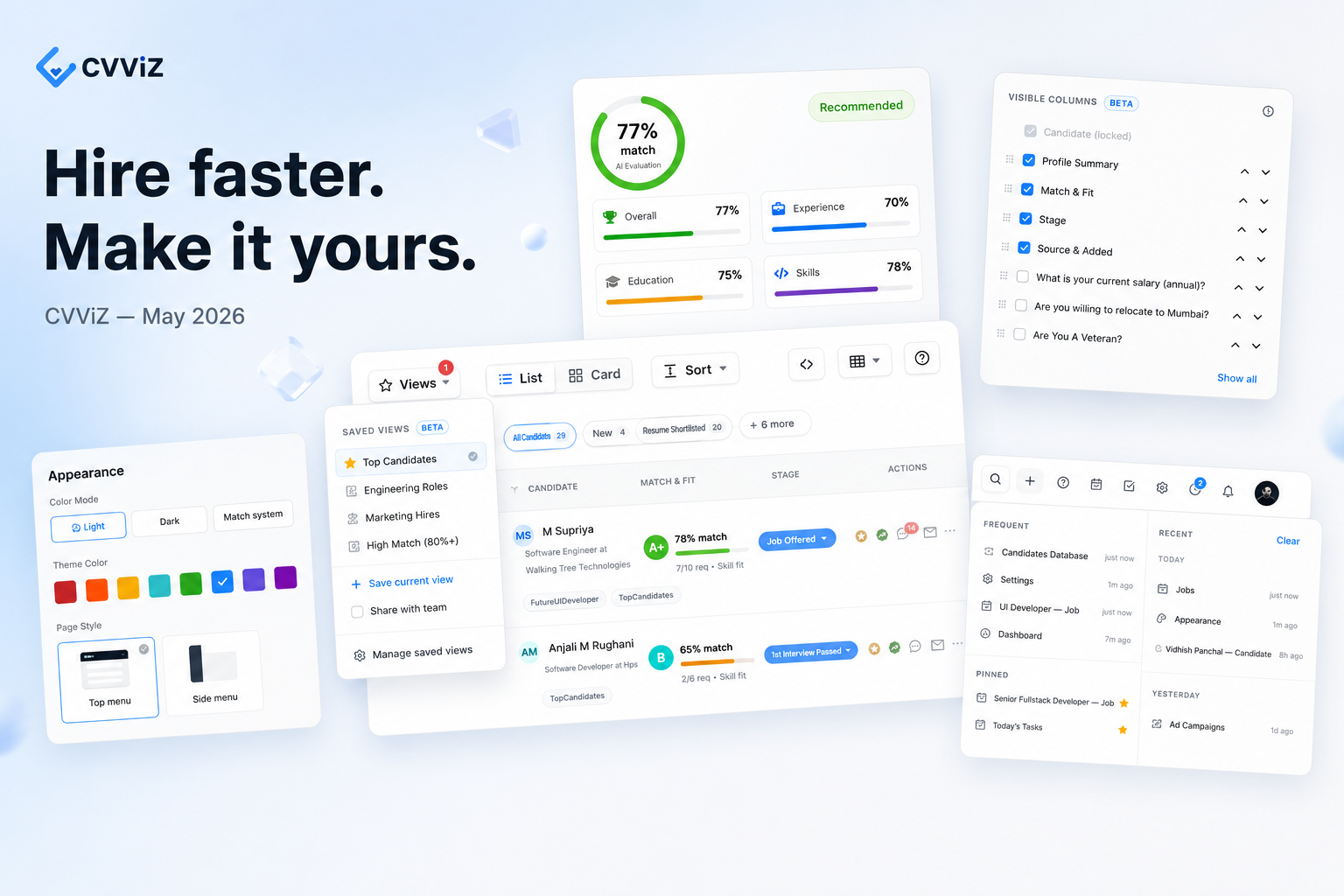
Hire faster. Make it yours.
Redesigned Jobs and Candidates lists with powerful new toolbars, Saved Views everywhere, customizable Appearance, and in-app Help & Support — all in one release.
🆕 New
🎯 The redesigned Candidates view
We rebuilt the candidates list from the ground up — and rolled it out across both Job Candidates and the Candidates Database, so the experience is the same wherever you screen.
🧰 A powerful new toolbar
⚡ Take action without losing your place
Sticky selection bar follows you while you scroll
Redesigned bulk actions for delete and tagging
Contextual row actions so the next step is always one click away
Dedicated mobile candidates list for screening on the go
🪟 Two ways to review
Card mode — a scannable, visual layout for quick triage
List mode — a dense, tabular layout you can sort and customize
🚦 Surface the right signals
Skill-fit indicator highlights the strongest matches at a glance
Refreshed identity, facts, and signals layout makes scanning feel natural
💼 The redesigned Jobs list
We gave the Jobs list the same first-class treatment — a refreshed layout, redesigned cards, and a powerful toolbar so finding the right requisition is as fast as finding the right candidate.
🧰 A new Jobs toolbar
🔖 Saved views (beta)
Save the filters, sort, and columns you use most, and turn them into reusable lenses on your data. Switching between them is a single click.
✨ Make it yours
✏️ Name your view — "Top grade · last 7 days", "Visa-ready in NYC", anything that fits how you screen
⚡ One-click apply from the toolbar dropdown
✓ Active-view indicator so you always know which lens is currently applied
📑 View summary beneath each name shows the filters and sort at a glance — no need to apply just to peek
👥 Share with your team
🤝 Team-shared views — flag a view as shared and everyone sees the same lens
🏷️ Team tag marks shared views in the list so ownership is always clear
🔒 Delete protection — only the view's creator can delete a team-shared view
🛠️ Built for power users
🔗 Copy link to a view — paste it in Slack, email, or a doc and your teammate lands on the exact same list
☁️ Remote sync keeps your views consistent across sessions and devices
📋 Available columns (beta)
Tailor your candidates list to exactly the fields you care about — refresh, close the tab, come back later, your setup is right where you left it.
✅ Show or hide any column with a single click
🔀 Drag to reorder columns into the order you actually read them in — or use up/down arrows for keyboard-friendly reordering
📝 Pre-screening question answers can now be added as columns — see candidate responses right in the list, no clicking required
🔄 Reset to defaults in one click whenever a view drifts
🏷️ Hidden count badge in the toolbar tells you at a glance how many fields are off
💾 Saved in your browser — your show/hide and order choices persist across refreshes and sessions
🔖 Save as a Saved View — the saved-view button can now capture a column-only setup, so you can switch between different column layouts in one click
🚀 Quick Access dropdown
A new global launcher in the header that puts everything you touch most one click away.
🕐 Recently visited jobs, candidates, companies, campaigns, and reports
📌 Pinned items you can drag to reorder for the rituals you run all the time
⭐ Frequently visited — automatically surfaces your most-opened pages
🔎 Search with history — re-run a previous search in one click
🏷️ Filter chips for Jobs · Candidates · Companies · Campaigns · Reports · Tasks · Settings
🎨 Appearance settings (beta)
Make CVViZ feel like yours. A new Appearance area in Settings lets you tailor the workspace:
🌗 Color mode — Light, Dark, or follow your System preference
🎨 Theme color — pick a brand accent from a curated palette
📐 Layout — choose between top-menu and side-menu navigation
📌 Fixed header and sidebar so the chrome stays put while you scroll
☁️ Saved across browsers
⚡ Command Palette
A fast, keyboard-first launcher built into the candidates view.
🔑 Open from anywhere with ⌘ K (Mac) or Ctrl K (Windows / Linux)
🔎 Type to search for actions, sort presets, filter presets, and view modes
⚙️ Change sort, density, columns, and view mode in seconds — no menu hunting
🎹 Arrow keys to navigate · Enter to run · Esc to dismiss
⌨️ Keyboard shortcuts
A dedicated shortcuts panel — press ? anywhere to open it.
🔍 Job change frequency filter
Find candidates by how stable their tenure is — and surface profiles that match your hiring bar for stability.
📄 Advanced parsing preview
Richer parsed-resume fields are now surfaced right inside the candidate row — current and previous companies, tenure, location signals, and more — so you can spot fit without ever opening the resume.
📊 A refreshed Candidate Evaluation
The Candidate Evaluation panel got a full visual refresh, so the strongest fit jumps off the page and scoring decisions take seconds, not minutes.
🎯 Cleaner breakdowns for Skills, Experience, Education, and Overall fit — each assessment in its own scannable section
📝 Tightened Evaluation Summary that gets to the point faster
📈 Clearer statistics so the score tells a story at a glance
📂 Collapsible sections to focus on what matters right now
💬 Help, messages, and tickets — without leaving the app
A dedicated in-app Help & Support experience now lives one click away in the global header.
📚 Help articles — browse a searchable knowledge base for how-to guides and best practices
💬 Live messenger — chat with our team directly from any page
🎫 Submit a ticket — file a support request and track its status
💡 Share feedback — post feature requests and product ideas
📰 Release notes drawer — read what's new (like this) right where you work
✨ Improved
🏢 Smarter Add Job — when you select a customer, the address now auto-fills from the customer record, so you don't have to retype it
🔢 Active-filter count is now shown right on the filter button, with a helpful tooltip
🔄 Self-healing after deploys — the app now recovers automatically from stale assets instead of showing an error
🔧 Flexible Evaluate — the Evaluate dropdown now supports a configurable trigger for more workflows
🏷️ Smoother bulk tag and delete flows with better tag handling and loading states
🐛 Bug fixes
✅ Fixed selected-row styling and sort behavior in the candidates list
✅ Resolved a crash in the Campaign Editor on certain page loads
♿ Restored focus rings on clear buttons for keyboard navigation
💬 Want to see something in next month's release? Click the in-app Feedback button or just reply to this email.
— The CVViZ team